Monday, July 16, 2012

Geodesic Airolite Classic 14 Part 1

Once again I have to apologize for neglecting this blog. In any case, here's an interim post about the boat I'm working on: a Geodesic Airolite Classic 14.

The Geodesic Airolite line of boats were designed by the late Platt Monfortt, based upon observation of airplane construction methods. The distinguishing features are a very light wooden frame, a heat-shrunk dacron skin and diagonal kevlar roving. These combine to produce an incredibly lightweight and aesthetically pleasing boat what is surprisingly robust. For plans and a list of their boats, see the company's website here.

A few years ago I built a Snowshoe 14 canoe from a Geodesic Airolite kit and it turned out wonderfully. Pics here. I wanted a sailboat that I could cartop and launch single-handedly and the Classic 14 appears to fit the bill. It is modelled on a New York Whitehall boat and the specs list the weight at 54 lb for a 14 foot long boat with a 48.5 inch beam.

The first step is to cut out and mount stations to act as forms for the construction. You can see my airolite canoe hanging from the ceiling.


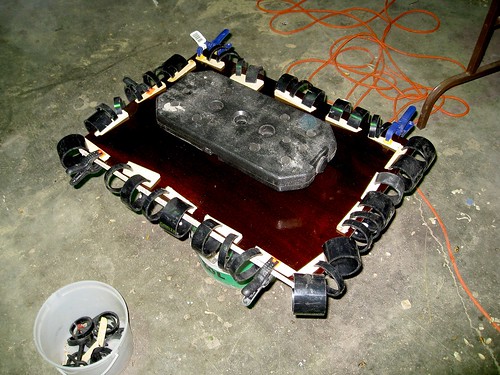
The longitudinal stringers are ripped from structural lumber and clamped to the stations. The clamps shown are made from slices of ABS pipe.


The notches for the stringers in the transom are cut to fit due to the compound angle. The stringers are left oversize to be cut to length after the epoxy dries. This is much easier than the double-ended canoe which required compound cuts to fit each stringer exactly to length.


The ribs are next installed. These are steamed to help bend them to shape.


The steaming rig I used is just 2" ABS pipe connected to a coffee can with some aluminum foil and heated with a hotplate. Others suggest a more complex setup with insulation, etc, but this worked fine.


I had a failure on the connection between gunwale and transom, so I beefed it up a bit, which required a bit more complicated clamping than usual.


Here's a shot of the boat just after it came off the stations. This is where I broke the transom-gunwale joint as it wasn't strong enough to carry around without the inwales and seats installed. Note the daggerboard slot.


Here's a detail showing the inwales and the construction of the seats which also help support the daggerboard well


Frame faired and sealed. Next step is applying kevlar.


Since this is a sailboat, there are a couple items to make in addition to the hull. Here's a pic of laminating two pieces of cedar to make the boom:


A sailboat also requires two foils: a daggerboard to resist sideways motion and a rudder to control direction. I made mine out of laminated plywood with an elipsical leading edge. This photo shows initial shaping of the leading edge. I did rough shaping with a power plane, followed by hand plane and sandpaper.


Filling some voids after shaping the trailing edge.


I covered the daggerboard with one layer of unidirectional fiberglass. But not before dropping the epoxy-coated board in a pile of shavings.

Monday, September 20, 2010

Console Record Player Retrofit

I apologize for the long gap between posts; most of my work has been proprietary recently, so there's not too much to share on the blog.

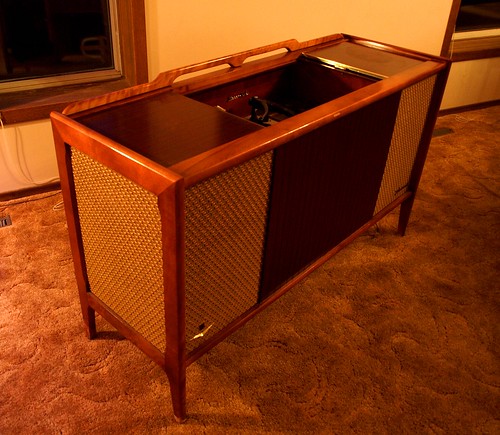
Therefore, I'm presenting a personal project: a retrofit of a late-1960s era cabinet record player. It's a Fleetwood model 4057, made in Montreal, serial 283. It came complete with AM and shortwave radio, record player and tape input, powered by a tube amp rated for 117 V, 0.95 A at the input. I believe these units were retailed by Sears. The guts were all removed and replaced by a modern turntable, digital music player, amplifier and controller.

Cabinet

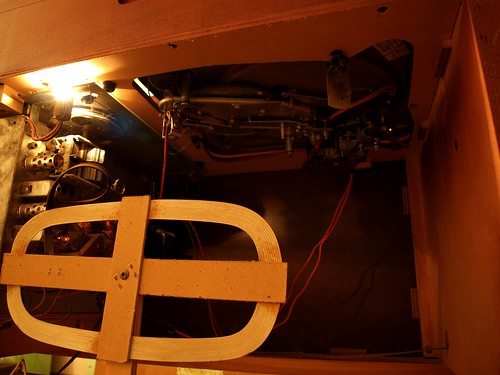
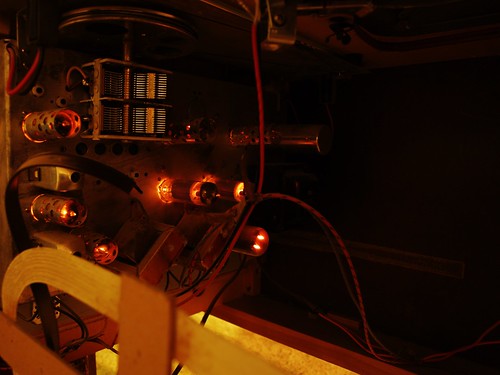
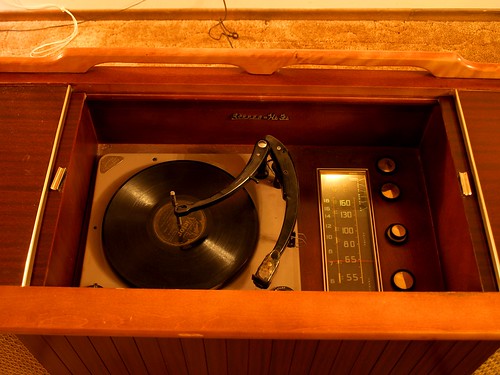
Before the retrofit, the unit lights and tubes lit up. On radio, it crackled when you adjusted the volume but couldn't be tuned to any station. The record player wouldn't rotate and no sound was produced when the record was turned by hand. So the radio/amp was removed and sent to the tube amp hospital and the record player went to the morgue.

Tube Amp and Turntable Guts

Tube Amp

Turntable and Radio

The first step in the retrofit was to replace the record player shelf as it had a large cutout for the sunken turntable. I took this opportunity to add some vibration isolation. I expected structural feedback to be a significant problem because the speakers and turntable are mounted in the same unit, as opposed to satellite speakers. Thus, the turntable shelf was designed to be a massive vibration isolator. The shelf is constructed of a wood frame with hardboard top and bottom panels, filled with sand.

Isolation Platform

Isolation Platform

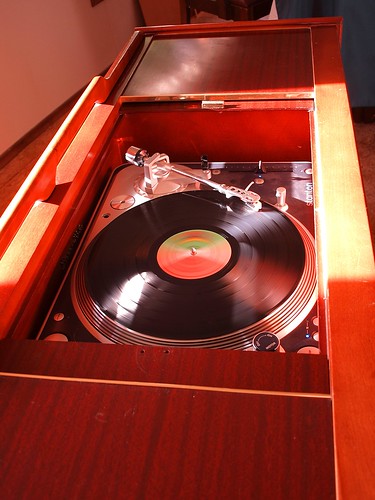
The turntable was replaced with a Stanton T.80 turntable, capable of digital S/PDIF output.

Turntable

Next: digital music. Digital music is played by a VIA Epia M10000 mainboard. This is a small form-factor (Mini-ITX) low-power computer. It's a bit underpowered for video, but is perfect for a mp3 and internet radio player. I've installed Ubuntu server and use VLC as a media player, controlled either over SSH or with its web interface.

Amplifier

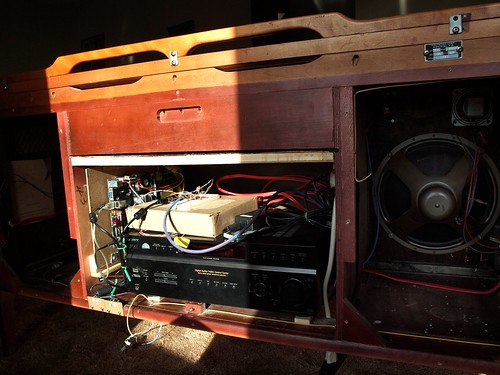
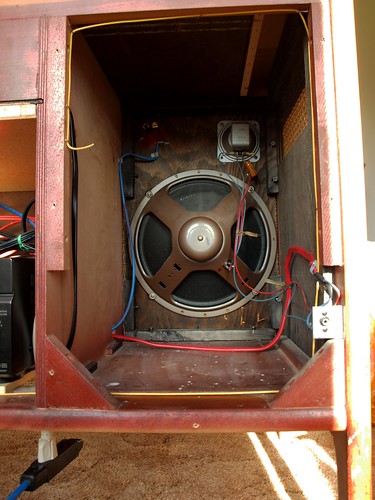
The amplifier is an older Sony, purchased second hand for cheap. It sits in the centre cabinet. The computer provides one analog input and the turntable provides a digital input. The integrated speakers mean that the speaker cables need not be flexible after installation, so I used solid 12-gauge residential electrical cable ($1/foot at Rona for essentially no resistance and no chance of phase distortion from complex impedance). The original speakers (12-inch woofer and tweeter) haven't been replaced yet (and may not be).

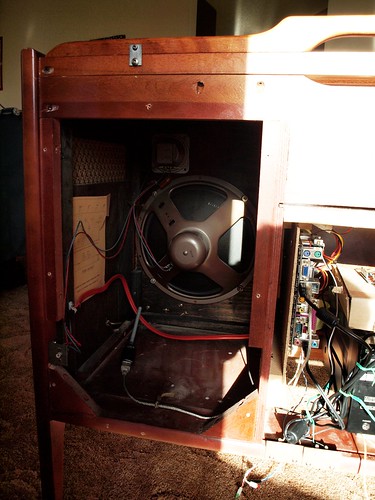
Left Speaker

Right Speaker

Since the amp is mounted in the belly of the cabinet, the remote no longer works. I worked around this by using a microcontroller to relay the IR remote signals. There is an IR sensor behind the cloth of the right speaker, which is processed by an ATMEGA168 microcontroller. Signals destined for the amplifier (Master Volume, etc) are repeated on an IR LED temporarily taped to the amplifer's remote input. Signals that target the digital music player (track forward, etc) will be passed to the computer over USB (this functionality is not done yet). The USB link will also allow one to control the amplifier over the network. A preamp and mixer will use digital pots driven by the microcontroller to adjust the relative levels and tone of the turntable, digital music player and an aux input. This function is not yet operational, but I can dim three leds using the remote. All of this is being prototyped on an Arduino board since it has USB connectivity and there is a nice library of IR remote functions (written by Ken Shirriff).

Fake remote

So how does it sound? I haven't done any acoustic analysis yet and I hate audiophile-style subjective reviews, but, to my ears, it sounds really good, especially considering the vintage speakers. There is no discernible distortion at normal listening levels (as long as I remember to set the soundcard gains to avoid digital clipping).

Unfortunately, my massive sound isolator is not super effective. At high gains there is a 94.1 Hz feedback that can be eliminated if I put all my weight on the cabinet. This frequency corresponds to a 10.6 ms delay (assuming there is no signal phase changes) which at a sonic speed through wood of 3300 m/s would require a signal path of 35 m, clearly much longer than the size of the console. This leads me to believe there is a significant delay in the turntable's analog to digital conversion process. Perhaps switching to the analog output (with presumably no delay) will solve this problem, although it may just move it to a higher frequency. Alternately, the solution may be to reduce the coupling between the cabinet and the turntable shelf. The shelf is a relatively tight fit so the effective spring between the console and the shelf is relatively stiff. I plan to modify the shelf mounting so that it has no solid contact with the cabinet, being suspended on acoustic foam or a semi-liquid like acoustic caulk or Blutack.


Next: performance characterization and speaker optimization.

Edit 20/09/2009: I almost forgot to mention that I plan to host a session on microcontrollers at Bar Camp Saskatoon.

Wednesday, September 30, 2009

Thesis Download Link

My PhD thesis is now available for free download at lulu.com. Or get a beautiful hardcover copy for $18.83.

Saturday, July 11, 2009

Bar Camp Auckland


Today I gave a presentation on microcontrollers at Barcamp Auckland. As promised, the slides can be found here until I find a more permanent host (7.2 MB). (Image: Ioan Sameli.)

Update: That link is dead. You'll have to email me to get the presentation or suggest a file host.

Thursday, June 18, 2009

Peak Estimation


Sometimes it is important to be able to estimate the peak of a sampled continuous function between the samples. This is called subsample peak interpolation and is used in radar, delay estimation, and communication. Typically one fits a model to the sampled data and then finds the maximum of the model. Two models that I have used are parabolas and Gaussian curves. Both have three parameters and can be fit exactly to three samples (even if the samples are not evenly spaced), and, as a bonus, closed form solutions exist for parameters. I've written up a Matlab package to demonstrate this procedure, to be found here. The plot above shows an example, finding the peak of the green curve sampled at the blue markers (click to enlarge).

Friday, June 5, 2009

Fast Correlation

I've uploaded a small package to the Matlab File Exchange to improve the speed of your cross correlations. This package uses the FFT to calculate the circular cross correlation of two periodic signals. Since the FFT calculates the DFT of a N-point signal in O(N log N) calculations (rather than O(N2)) it is much faster than the naïve method, especially for long signals. In Matlab, the fft method is faster than the multiplication method in all but the most trivial cases, as shown in the image, plotting the ratio of the speed of the fast method to that of the naïve method from the definition. The figure also shows that the fft algorithm is typically fastest when N is a power of 2, and slowest when N is prime.

Tuesday, May 12, 2009

Installing Gnuarm ARM Toolchain on Ubuntu 9.04

It can be surprisingly difficult to install an ARM toolchain on Linux. As far as I know, there's no apt package that is currently maintained, so you have to build it from source. This posting shows how I installed the gnuarm toolchain on Ubuntu 9.04 (Jaunty Jackalope). I installed Ubuntu on a VirtualBox virtual machine, but it should work the same for a regular install.

The toolchain includes a number of pieces: binutils, which includes the linker, assembler, etc; gcc, the compiler; newlib, a standard C library for embedded systems; and GDB, the debugger. I also included Sam_I_Am and sam7utils, which allow one to program ATMEL SAM microcontrollers over USB.

First you need to install some dependencies. It's a good idea to upgrade your system at this time also.

sudo apt-get update
sudo apt-get dist-upgrade
sudo apt-get install libgmp3-dev libmpfr-dev build-essential zlib1g-dev libncurses5-dev patch texinfo libreadline5-dev


The following script should install the components. It's based on a script from Uwe Hermann which fails to build on Ubuntu. Comment out the last section if you're not using ATMEL harware. The USB serial modules isn't included in the 2.6.28-11-generic kernel that is the current kernel, so you may have to upgrade to 2.6.28-12-generic using the pre-release sources. You can check your kernel version with
uname -a

The .samiamrc file is for AT91SAM7S256 device; you'll have to edit it if you use a different one.
Run the following script with 'sudo' and get a coffee, it takes a while.

#!/bin/sh
# Written by Uwe Hermann , released as public domain.
# Edited by Travis Wiens

TARGET=arm-elf # Or: TARGET=arm-none-eabi
PREFIX=/usr/local/arm # Install location of your final toolchain
PARALLEL="" # Or: PARALLEL=""

BINUTILS=binutils-2.19.1
GCC=gcc-4.3.3
NEWLIB=newlib-1.17.0
GDB=gdb-6.8

export PATH="$PATH:$PREFIX/bin"

mkdir build

wget -c http://ftp.gnu.org/gnu/binutils/$BINUTILS.tar.bz2
tar xfvj $BINUTILS.tar.bz2
cd build
../$BINUTILS/configure --target=$TARGET --prefix=$PREFIX --enable-interwork --enable-multilib --with-gnu-as --with-gnu-ld --disable-nls --with-float=soft --disable-werror
make $PARALLEL all
make install
cd ..
#rm -rf build/* $BINUTILS $BINUTILS.tar.bz2

wget -c ftp://ftp.gnu.org/gnu/gcc/$GCC/$GCC.tar.bz2
tar xfvj $GCC.tar.bz2
cd build
../$GCC/configure --target=$TARGET --prefix=$PREFIX --enable-interwork --enable-multilib --enable-languages="c,c++" --with-newlib --without-headers --disable-shared --with-gnu-as --with-gnu-ld --with-float=soft --disable-werror
make $PARALLEL all-gcc
make install-gcc
cd ..
#rm -rf build/* $GCC.tar.bz2

wget -c ftp://sources.redhat.com/pub/newlib/$NEWLIB.tar.gz
tar xfvz $NEWLIB.tar.gz
cd build
../$NEWLIB/configure --target=$TARGET --prefix=$PREFIX --enable-interwork --enable-multilib --with-gnu-as --with-gnu-ld --disable-nls --with-float=soft --disable-werror
make $PARALLEL
make install
cd ..
#rm -rf build/* $NEWLIB $NEWLIB.tar.gz

# Yes, you need to build gcc again!
cd build
../$GCC/configure --target=$TARGET --prefix=$PREFIX --enable-interwork --enable-multilib --enable-languages="c,c++" --with-newlib --disable-shared --with-gnu-as --with-gnu-ld --with-float=soft --disable-werror
make $PARALLEL
make install
cd ..
#rm -rf build/* $GCC

wget -c ftp://ftp.gnu.org/gnu/gdb/$GDB.tar.bz2
tar xfvj $GDB.tar.bz2
cd build
../$GDB/configure --target=$TARGET --prefix=$PREFIX --enable-interwork --enable-multilib --disable-werror
make $PARALLEL
make install
cd ..
#rm -rf build $GDB $GDB.tar.bz2

sudo ln -s $PREFIX/bin/arm-elf* /usr/bin

cd ..
mkdir Sam_I_Am
cd Sam_I_Am
wget http://claymore.engineer.gvsu.edu/%7Esteriana/Software/Sam_I_Am-0.3.tar.gz
tar xfvz Sam_I_Am-0.3.tar.gz
cd Sam_I_Am-0.3
python setup.py install
cd ..
echo "
open /dev/ttyUSB0
version
set readallow 0 0x300000
set ramwriteallow 0x202000 57344
set flashwriteallow 0x100000 0x40000
" >> .samiamrc
cp .samiamrc ~/

rm /usr/bin/Sam_I_Am
echo "
#!/bin/sh
python /usr/local/lib/python2.6/dist-packages/Sam_I_Am/samiam.py $*
" >> /usr/bin/Sam_I_Am
chmod a=rx /usr/bin/Sam_I_Am

sudo modprobe usbserial vendor=0x3eb product=0x6124
#this fails on kernel 2.6.28-11-generic, upgrade to latest prerelease


#install sam7utils
cd ..
wget http://oss.tekno.us/sam7utils/sam7utils-0.2.1.tar.gz
tar xfvz sam7utils-0.2.1.tar.gz
cd sam7utils-0.2.1
./configure
make
make install
ln -s /dev/ttyUSB0 /dev/at91_0


You'll have to run

sudo modprobe usbserial vendor=0x3eb product=0x6124

each time you restart.

To program the device, use

sam7 --exec set_clock --exec unlock_regions --exec "flash main.bin"

Tuesday, March 17, 2009

Acoustic Bird Location and Directional Recording

A few weeks ago Victor Obolonkin and I traveled to Pureora Forest to record kōkako calls with my microphone array.

The microphone array is made of 12 microphones mounted on a 5 m beam, as shown mounted on the van.


Using beam-forming techniques, we can turn the microphones into a highly directional microphone which can be electronically "steered" in any direction. This is better than a traditional dish-type of directional mic, because we can steer the beam in any direction after the recording is made, allowing us to listen to two or more birds with overlapping calls. You can listen to an example of the power of the system below. The first file is a recording of a kōkako using a single microphone, which includes background noises from other birds and insects.


The next is a recording using the full array, steered in the direction of the kōkako. Many of the background noises are greatly attenuated, especially the sounds between 6 and 15 seconds.


Here is a photo of the kōkako in its tree, as well as a zoomed in version.


We can also do the opposite: use the array to locate the direction that the sound came from. This array has an angular resolution of approximately 4° for a sound of 1000 Hz, which is much better than a human ear. We intend to use this capability to track endangered birds, such as the kōkako, by using two arrays to triangulate their position.

An example of tracking a sound is shown below, recorded at the Physics Field Site at Ardmore. This shows the sound pressure level over time and angle from the array. You can see a steady source at approximately 90° (straight in front of the array); this is a speaker transmitting a kokako recording. You can also see a source that moves between 120° and 180°, a helicopter flying nearby.

Zoom in for a better view.

Thursday, February 19, 2009

Driving Times in NZ


After our trip around the South Island, I got to thinking about how long it takes to get everywhere in this small country. So I made this map of the driving time from our house in Auckland to everywhere in the country. The driving times come from a Matlab script I wrote that queries Google maps, and the mapping functions are from M_Map for Matlab, using shoreline data from GSHHS. Click it for higher resolution.

Monday, January 19, 2009

MLS and Kasami Set Generators for Matlab

Linear feedback shift registers (LFSR) are a simple method of generating sequences, including pseudorandom number sequences. Some of these LFSR sequences have special properties; a maximal length sequence (MLS or m-sequence) has a large autocorrelation at zero lag, with near zero autocorrelation elsewhere. This 'impulsive' autocorrelation function allows one to quickly determine the impulse response of a linear time invariant (LTI) system.

Maximal length sequences are also the base for sets of sequences with good correlation properties. One such set is the small set of Kasami sequences. These sequences have small off-peak autocorrelations and also small cross correlations between sequences. This property allows for code-division multiplexing as well as accurately determining the arrival time of a transmitted sequence, even in the presence of other interfering transmissions.

I've uploaded some Matlab code for generating LFSR sequences, m-sequences, and sets of Kasami sequences, as well as examples. As alwasy, find it here. Please review, rate, or leave feedback so that I know people are finding these uploads interesting.